Sharing files between devices that are on the same Wi-Fi shouldn't involve a cloud server. But it usually does.
AirDrop works great if you're all-in on Apple. The moment you throw in a Windows laptop, a Linux box, or an Android phone, you're back to emailing yourself or uploading to Google Drive for a file that needs to travel three feet.
I built NearDrop to get rid of that problem.
What Is NearDrop?
NearDrop is an open-source desktop app that turns your machine into a local shared drive. Any device on the same network can browse, upload, and download files through a web browser. No app install on the other side.
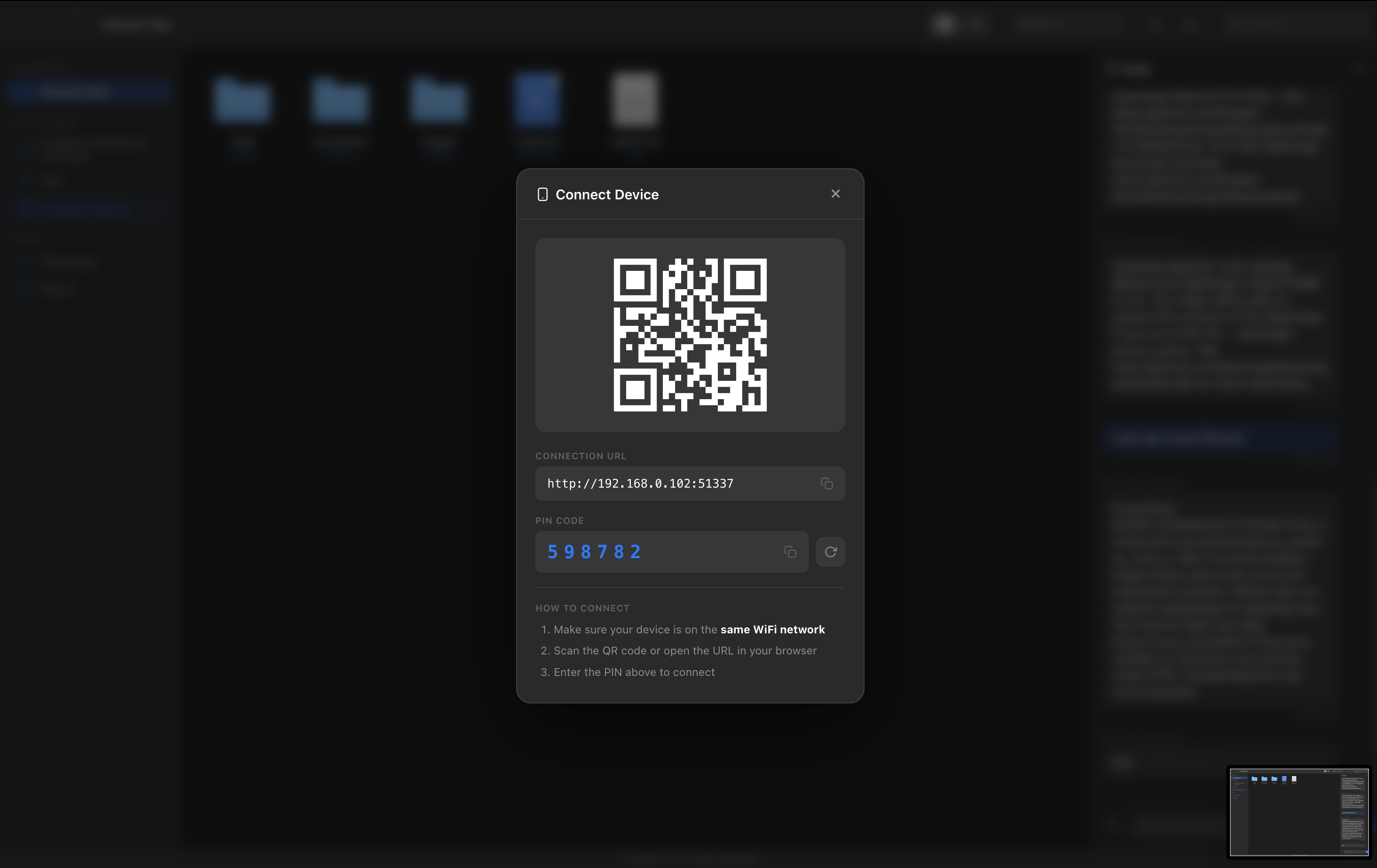
Open NearDrop on your computer.
Scan the QR code (or type the URL) on your other device.
Enter the 6-digit PIN.
Start sharing.
No accounts. No sign-ups. No internet. No cloud.
Why I Built It
I use a Mac, a Windows PC, and a Linux server daily. I also pull files onto my phone constantly. Every existing option had a catch:
AirDrop - Apple-only.
Cloud services - Need internet and an account. Your files pass through someone else's server.
USB cables - Works, but annoying when you're switching between machines all day.
Bluetooth - Slow for anything bigger than a photo.
Other LAN tools - Most require installing software on every device, or their UI looks like it hasn't been updated since 2005.
I wanted something that worked across every OS and only needed a browser on the receiving end.
How It Works
NearDrop uses Electron for the desktop shell and Express for the local server:
Electron handles the window, system tray, and auto-updates.
Express runs a local web server that serves the file browser and handles uploads/downloads.
WebSockets handle real-time chat and device presence.
When you launch NearDrop, it starts a server on your machine and detects your LAN IPs. Other devices connect through their browser. The host machine's shared folder becomes accessible to everyone on the network.
Everything stays on your local network. Nothing goes to the internet.
Features
File Browser
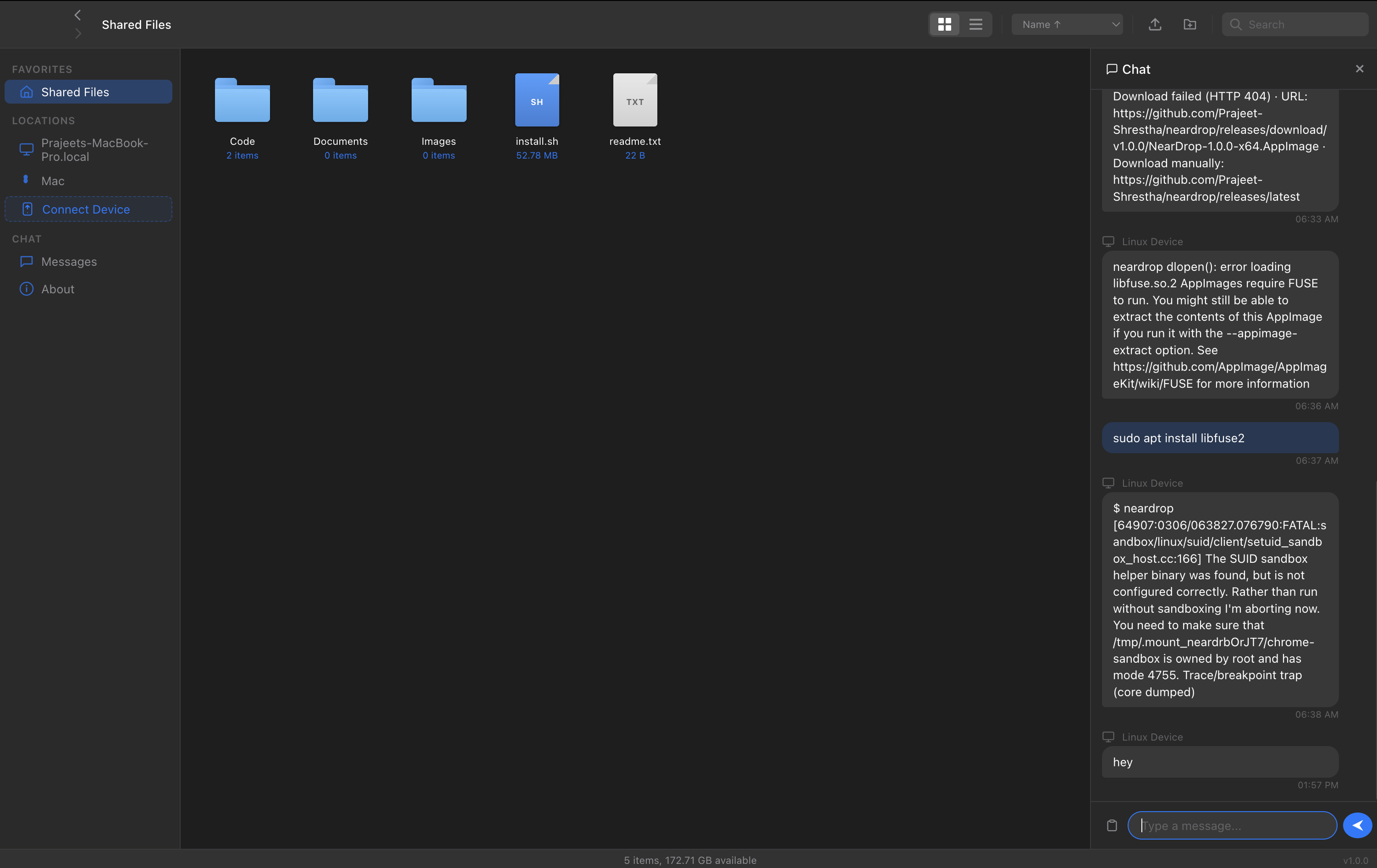
Not a bare upload form. It's a Finder-style file browser with icon view, list view, sorting, search, breadcrumb navigation, and drag-and-drop. It feels like a file manager, not a web page.
Built-in Chat
Real-time messaging between all connected devices. Useful for coordinating which file to grab or sharing quick text snippets.
QR Code Connect
Scan the QR code from your phone and you're in. No typing IP addresses.
PIN Authentication
A random 6-digit PIN is generated on each start. Other devices need the PIN to get in. Sessions are bound to the client's IP, so a PIN used on one device can't be replayed from another.
Cross-Platform
Host: macOS (Apple Silicon + Intel), Windows, Linux
Client: Anything with a browser. Android, iOS, ChromeOS, another PC.
Auto-Update
Checks GitHub Releases on startup and shows a progress bar when downloading updates.
Privacy
This wasn't bolted on. The whole app is built around it:
No cloud. Files stay on your network.
No accounts. Nothing to sign up for.
No telemetry. The app doesn't phone home.
No internet required. Works in airplane mode, on isolated networks, wherever.
The Design
I wanted this to feel like something you'd actually want to open. The UI takes cues from macOS Finder's dark mode: warm grays, frosted glass, Apple's SF Blue as the accent, and clean animations.
The landing site follows the same look. There's a terminal-style hero with tabs for one-liner, npm, and binary installs.
Electron handles a lot, but the gaps are real. Disk space detection uses df on Unix and PowerShell on Windows. macOS has Gatekeeper. Each platform handles system tray differently. These small things add up.
LAN doesn't mean safe
I ran a security audit and found actual issues: shell injection in a utility function, PIN leaking through API responses, timing-unsafe comparisons. "It's local" is not a security model.
The browser is the ultimate client
Making the client-side a web app means any device with a browser works. No native apps to build for Android, iOS, etc. The host runs Electron; everyone else just opens a URL.
Polish matters
Most LAN file transfer tools are functional but ugly. Putting effort into the UI, the dark mode, the animations, changed how people responded to the project. People use tools they like looking at.